
Way back in 2016, I initially tried out an ultrawide monitor in hopes of simplifying my desk setup. Instead of running two different monitors connected to a desktop and my work laptop, I thought a single 34” ultrawide one would clean up a lot of cables. I bought a Dell U3415W because it was one of the few monitors at the time that had a built-in KVM for switching between my two computers. And for several years this worked great! My display cable and power cable clutter got cut in half, and it allowed me to run everything off the monitor’s USB hub instead of keeping a separate one.
Then the pandemic happened in 2020, I started working almost fully remote most of the time and had to start sharing my screen over a Zoom/Teams meeting quite a bit. On a 34 inch ultrawide, sharing your entire screen creates a problem for most participants unless they are also using an ultrawide - otherwise sharing your 21:9 aspect ratio on their 16:9 or 16:10 screen makes it difficult for them to read text or distinguish finer points of diagrams or slides. There are ways around this, like switching to custom resolutions using a tool like BetterDisplay Pro on Macs, but it’s not a great user experience at all.
When I switched jobs in 2020, I was sent a 27” Lenovo ThinkVision monitor as part of my onboarding package. It was a cromulent work monitor and nothing more - 2560 x 1440, 60 Hz, no speakers. I began using this as a secondary monitor purely for sharing my screen and discovered it made everything much simpler. Sometime in 2021, I ended up buying a GPU and monitor bundle from Antonline with another 27” Lenovo monitor that was also 2560 x 1440, but supported up to 165Hz. I combined both 27” monitors into a new dual monitor setup and instantly felt more productive, even if it meant I had to do a lot more cable management. I added a uGreen USB KVM to replace the Dell’s built in one and didn’t miss a beat.
I kept this setup until just over a month ago, when I moved houses and wanted to set things up a little differently in my new home office. Instead of keeping my gaming desktop in the office like I’ve been doing for over a decade now, I moved it down to the basement and hooked it up to my LG CX television. Most nights, the last thing I want to do is come back to the same desk I work at to play video games, so this allowed me to separate my relaxation area in the house from my work area. But it also meant that I could reevaluate the monitor situation in my office, now that gaming features were not as much of a priority.
I went back and forth on getting two newer 27” monitors that were tailor made for HiDPI (Apple Studio Displays, Asus ProArt, a variety of BenQ models), but too often found them limited to 60Hz refresh rates, which is hard for me to go back to. I then looked at a few types of ultrawides, such as the spiritual successor to my previous Dell, the Dell U4025QW and the LG 40U990A-W. Both had their pros and cons - while the Dell supported up to 5K2K @ 120Hz with 140W power delivery with Thunderbolt 4, it felt incredibly expensive at $2,400. The LG was even more technically impressive, boasting a Thunderbolt 5 connection, but many reviews I read complained about the noise from the built-in fan that was necessary to cool it. It was slightly cheaper than the Dell at $1,800 but still cost a lot for something I wasn’t sure I would be happy with.
Then I noticed another alternative - the Lenovo ThinkVision P40WD-40. At first glance, it seemed very similar to the Dell - 5K2K, 120Hz, HDMI 2.1, 140W power delivery with Thunderbolt 4 and a built in KVM. But the bonus was that it was on sale for a mere $840 at the time - a third of the cost of the Dell! I figured that even if I had some growing pains using it for work, it was worth the shot and ordered it.
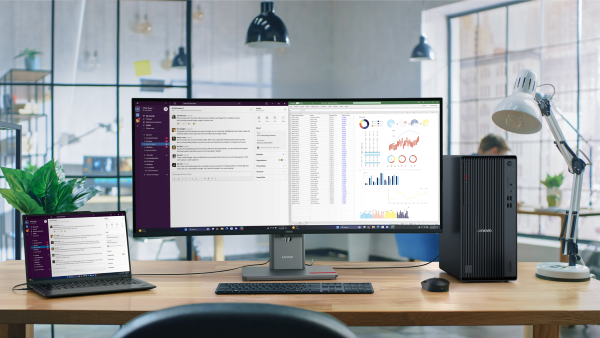
I’ve been using it for about a month now and I have to say that I’ve been very happy with it. Sharing over Zoom is not as much as a problem as I had feared - I just have become sharing individual windows or a region of my screen instead of an entire second monitor like before. The monitor is just the right width for an ultrawide for me - I fear if it was much larger, it would be hard to keep attention on the edges. The refresh rate works great on macOS and my work M4 Max Macbook Pro drives it without any issue.
One of the coolest features I was not aware of when I ordered it is that it has a USB-A port on the top to help with webcam placement and cable management. Lenovo has even made a webcam specifically made for this port called the MC60 that connects without any cable at all - which will further help your cable management efforts. They also make a soundbar that can be used with the same slot in conjunction with the webcam, but when I tested it out, it had much worse sound than the monitor itself, so I returned it.
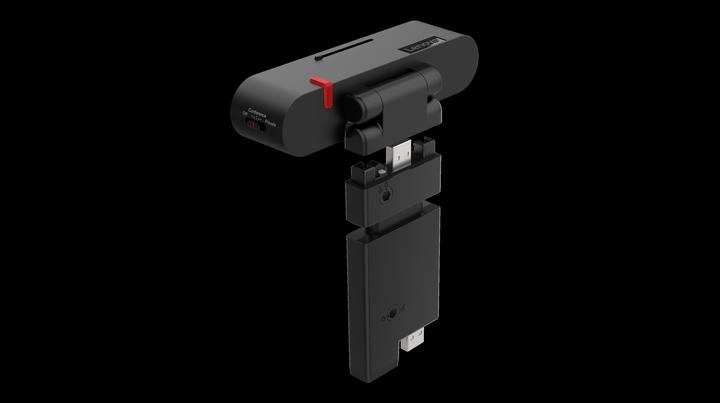
When I went to look up the monitor for this blog post, I noticed that it is sold out everywhere, and has been almost entirely scrubbed from Lenovo’s website. A quick search on Reddit suggests it’s been discontinued, which is a shame because it’s a great alternative to the pricer options out there. And I’m very much looking forward to improved support for ultrawide displays in macOS 27 Golden Gate this fall, which claims to have native support for 5K displays at 120Hz.